yes24 판매지수의 로그가 남지 않아서,
판매량의 변화를 알고 싶어서 간단하게 짰습니다.

예약작업이나 시작프로그램에 넣으시거나, crontab 등에 등록해서 돌리면 됩니다.
하루에 한번만 실행되며, 레코드가 이미 존재하는 경우에는 다시 쓰지 않습니다.
sqlite3를 사용하므로, 데이터확인은 직접 콘솔로 확인하셔도 되고, db 클래스의 확인용 함수를 사용하셔도 됩니다. 저는 아래 그림과 같이 firefox용 sqlite manager를 써서 확인합니다.


소스코드는 다음과 같습니다.
수집대상을 바꾸려면 초반의 books 사전정보를 변경하시면 됩니다.

import urllib2, time, traceback
from BeautifulSoup import BeautifulSoup
import sqlite3

books = {
    'python':'http://www.yes24.com/24/goods/3432490',
    'lua':'http://www.yes24.com/24/goods/3081202'
}

def getContent( url ):
    req = urllib2.Request( url )
    response = urllib2.urlopen(req)
    return response.read()

class DB:
    "SQLITE3 wrapper class"
    def __init__(self):
        self.conn = sqlite3.connect('bookDB')
        self.cursor = self.conn.cursor()
        for title in books.keys():
            self.cursor.execute('CREATE TABLE IF NOT EXISTS %s(date text, sale int)'%title)
            self.cursor.execute('CREATE UNIQUE INDEX IF NOT EXISTS IDX001 ON %s(date)'%title)
       
    def __del__(self):
        self.conn.commit()
        self.cursor.close()

    def insertPython(self, title, date, sale):
        try:   
            self.cursor.execute("INSERT INTO %s VALUES ('%s',%d)"%(title,date,sale))
        except:
            print '%s : maybe already inserted'%title
            return 0
        else:
            print '%s: success'%title
            return 1

    def printPythonResult(self, title):
        self.cursor.execute('SELECT * FROM %s ORDER BY date ASC'%title)
        for row in self.cursor.fetchall():
            print row[0],'\t', row[1]

    def printPythonResult(self, title, num):
        self.cursor.execute('SELECT * FROM %s ORDER BY date DESC LIMIT %d'%(title,num))
        for row in self.cursor.fetchall():
            print row[0],'\t', row[1]

db = DB()

if __name__ == "__main__":
    curtime = time.localtime()
    curday = "%d/%02d/%02d"%(curtime[0],curtime[1],curtime[2])
   
    for title,url in books.items():
        content = getContent( url )
        soup = BeautifulSoup( content )
       
        a = soup('dt', {'class':'saleNum'})
        salenum = -1
        if len(a)>0:
            try:
                text = str( a[0].contents[0] ).split('|')[1]
                #print text
                splited = text.split(' ')
                for s in splited:
                    if s.isdigit():
                        salenum = int(s)
                        break           
            except:
                traceback.print_exc()
               
            print title, ': try to insert :',curday, salenum
            db.insertPython( title, curday, salenum )
           
            print title, ': === recent 10 sale points ==='
            db.printPythonResult( title, 10 )
       
    time.sleep(5) # for reading results....

파일 다운로드 : [ salepoint_checker.py ]

ps. python 2.5 기반입니다.
  
AND

오늘 하루종일 꿀꿀했는데,
귀가 후에 강컴 오늘의 베스트를 확인해 보니 1위를 탈환했네요.
덕분에 급방긋모드가 되었습니다. ^^


http://kangcom.com/best/?topId=4

AND

이전에 잠시 언급한 적이 있었던,
마소에 기고한 글이 드디어 7월호에 나왔습니다.

http://www.imaso.co.kr/?doc=bbs/gnuboard.php&bo_table=article&page=1&wr_id=33214

제목은 "파이썬 이용해 검색엔진 만들기 - 블로그 크롤러 구현" 입니다.

4월 중순에 다움 사이트 템플릿이 바뀌면서 수정을 좀 했었고,
6월 말과 7월1일 현재, 잘 동작하는 것을 확인했습니다. :)
AND

드디어 기다리고 기다리던 Python 3 programming의 예약판매가 시작되었습니다.
이제서야 끝날듯 말듯하며 계속된 교정작업이 끝난 느낌이 드네요.


밤 늦게 까지 교정을 직접하시며 챙겨주신 위키북스 박찬규 대표님, 박찬규님과 함께 저희를 도와주신 위키북스 김윤래 팀장님, 저술 초기부터 꼼꼼하게 수정사항을 짚어주신 이대엽님, 릴리즈 일정으로 바쁜 와중에서도 새벽까지 리뷰 의견을 보내 주신 김용현님, 본인의 번역 일정이 진행 중임에도 최종 원고를 꼼꼼히 검토해 주신 손영수님에게 감사의 말씀을 드립니다.

그리고 주옥과도 같은 데이트 시간을 쪼개가며 휴식시간도 없이 달린 우상정
씨, 최동진씨가 없었다면 이 책은 완성이 안되었을 겁니다. 수고하셨습니다.

마지막으로, 맨날 컴터 앞에 앉아 있는 저를 끝없이 지원해 주는 울 마눌님과 야근과 취미생활로 많이 놀아주지 못하는 아빠를 가장 사랑하는 보연이가 1등 공신입니다.
AND

4. Rss.py는 다음과 같습니다.
mod_python으로 연결해 놓으시면 됩니다.

# -*- coding: utf-8 -*-

from mod_python import apache
import pickle, re
import os.path, time

url_head = "http://asialadders.battle.net/war3/ladder/W3XP-player-profile.aspx?Gateway=Kalimdor&&PlayerName="

def conv( date ):
    ds = date.split(',')
    ds1 = ds[1].split(' ')
    ds2 = ds[2].split(' ')
    date = ds[0][:3]+', '+ds1[2]+' '+ds1[1][:3]+' '+ds2[1]+' '+ds2[2]+' '+ds2[3]
    return date
def getInfo( ):
    f = open('/var/www/war3/info', 'rb')
    info = pickle.load( f )
    f.close()
    return info

def handler(req):
    req.content_type="Text/xml"
    req.send_http_header()

    t = os.path.getctime('/var/www/war3/info')
    pubdate = time.asctime( time.gmtime(t) )

    body ="""<?xml version="1.0" encoding="UTF-8"?>
<rss version="2.0">
    <channel>
        <title>Frozen Throne - Kalimdor Tracer</title>
        <link>http://cybershin.x-y.net/tt/</link>
        <description>누가누가 달렸나 모니터링 시스템</description>
        <language>ko</language>
        <pubDate>%s</pubDate>
        <generator>dsp generator</generator>""" %pubdate
    footer = """
    </channel>
</rss>"""
    info = getInfo()
    for i in info:
        user, level, date = i
        date = conv(date)
        level = level.replace('l','l ')
        link = url_head + user
        body += """
        <item>
            <title>%s</title>
            <link>%s</link>
            <description>%s, Last Ladder Game : %s</description>
            <author>(%s)</author>
            <guid>%s#%s</guid>
            <pubDate>%s</pubDate>
        </item>"""%(user, link, level, date, user, link, re.sub(' ','',date), date )
        # Sat, 18 Apr 2009 00:15:00 +0900
    body += footer
    req.write( body )
    return apache.OK


5. 성공적으로 실행되면 브라우저상에서 다음과 같이 잘 출력되는 것을 볼 수 있으며,
hanrss, outlook 등으로 연결해서도 잘 되는 것을 확인할 수 있습니다.

Frozen Throne - Kalimdor Tracer
누가누가 달렸나 모니터링 시스템
     
alpakook
Level 12, Last Ladder Game : Sat, 09 May 2009 1:54 AM
dspshin
Level 6, Last Ladder Game : Fri, 08 May 2009 12:40 AM
soudz
Level 22, Last Ladder Game : Thu, 23 Apr 2009 12:58 AM
milkelf
Level 9, Last Ladder Game : Sun, 03 May 2009 8:20 PM
sacrea
Level 2, Last Ladder Game : Sun, 12 Apr 2009 8:31 PM
again4you
Level 1, Last Ladder Game : Tue, 05 May 2009 6:49 PM

AND

이번 예제는 친구들이 워3를 했나안했나 체크해서,
rss로 제공해 주는 rss feed generator입니다. ㅎㅎ

1.
저는 Python으로 할 것이므로 mod_python을 설치/설정합니다.
당연히 PHP등 다른 언어 사용해도 무방.
> 방법 : http://cybershin.x-y.net/tt/188 참고.

2.
이 예제는 특정 사이트를 모니터링하며 해당 정보가 업데이트되면 RSS로 알려주는 예제입니다.
고로 Request가 올때마다 특정 사이트를 읽어서 답하면 너무 늦으므로 프로세스를 2개로 나눠서 실행합니다.
즉, 정보 수집을 맡는 Crawl.py 와 RSS결과를 반환해 주는 rss.py로 분리.

3. Crawl.py는 다음과 같습니다.
crontab 등으로 하루에 몇번만 실행시키면 됩니다.


#!/usr/bin/python
# -*- coding: utf-8 -*-

import urllib2, re, pickle, sys, time
from BeautifulSoup import BeautifulSoup

users = [
'alpakook', 'dspshin', 'soudz', 'milkelf', 'sacrea','again4you'
]

url_head = "http://asialadders.battle.net/war3/ladder/W3XP-player-profile.aspx?Gateway=Kalimdor&PlayerName="

def getInfo( user ):
    url = url_head + user
    contents = urllib2.urlopen(url).read()
    soup = BeautifulSoup( contents )
    B = soup('b', {'class':'small'})
    date = ''
    for b in B:
        if str(b).find(':')>-1:
            date = b.contents[0].strip().encode('ascii')

    level = ''
    lv = soup('div', {'style':"Z-INDEX: 200; LEFT: 75px; POSITION: relative; TOP: -25px"})
    if len(lv)>0:
        body = str(lv[0])
        sp = body.find('Level')
        ep = body[sp:].find('<')
        level = body[sp:sp+ep].strip()
        level = re.sub('\s', '', level)

    return level, date

if __name__=="__main__":
        print sys.version
        print 'run crawl.py : '+ time.strftime("%B %dth %A %I:%M ",time.localtime())
        info = []
        for user in users:
                try:
                        level, date = getInfo(user)
                except:
                        print sys.exc_info()
                else:
                        print user, level, date
                        info.append( (user, level, date) )

        #print info
        f = open('/var/www/war3/info', 'wb')
        pickle.dump( info, f )
        f.close()


>>> 나머지는 다음 글에...


AND

우분투 상의 python 2.5.2에서 python-gconf 간단한 예입니다.
배경화면 이미지를 set하며, notify가 제대로 오는지 확인하는 예제입니다.

소스 코드는 다음과 같습니다.

#! /usr/bin/python
import gconf
import sys, time
import gtk

BGPATH = '/desktop/gnome/background/picture_filename'
client = gconf.client_get_default()
client.add_dir('/desktop/gnome/background', gconf.CLIENT_PRELOAD_NONE)

def bg_changed( *args ):
    print '[Notify]', client.get_string( BGPATH )

def set_value( value ):
    client.set_string(BGPATH , value)

if __name__ == '__main__':
    if len( sys.argv ) > 1:
        param = sys.argv[1]
        if param.lower() == "server":
            print "[Server] Waiting........."
            client.notify_add(BGPATH, bg_changed)
            gtk.main()
        else :
            print "[Param]", param
            set_value( param )

즉, 아래와 같이 첫번째 인자로 'server'를 주면 notify를 기다리기만 하고,
다른 값을 주면 해당 값은 배경화면 파일명을 변경합니다.

dsp@dsplinux:/view/tmp$ ./gconf_test.py server
[Server] Waiting.........
[Notify] /home/dsp/Pictures/ss22-hires.jpg
[Notify] /home/dsp/Pictures/01641_sandilandslookoutsunset_1680x1050.jpg

dsp@dsplinux:/view/tmp$ python ./gconf_test.py /home/dsp/Pictures/ss22-hires.jpg
[Param] /home/dsp/Pictures/ss22-hires.jpg
dsp@dsplinux:/view/tmp$ python ./gconf_test.py /home/dsp/Pictures/01641_sandilandslookoutsunset_1680x1050.jpg
[Param] /home/dsp/Pictures/01641_sandilandslookoutsunset_1680x1050.jpg

cf. gconf 모듈이 gtk thread를 사용하므로 import gtk를 하지 않으면 동작을 안합니다.

AND

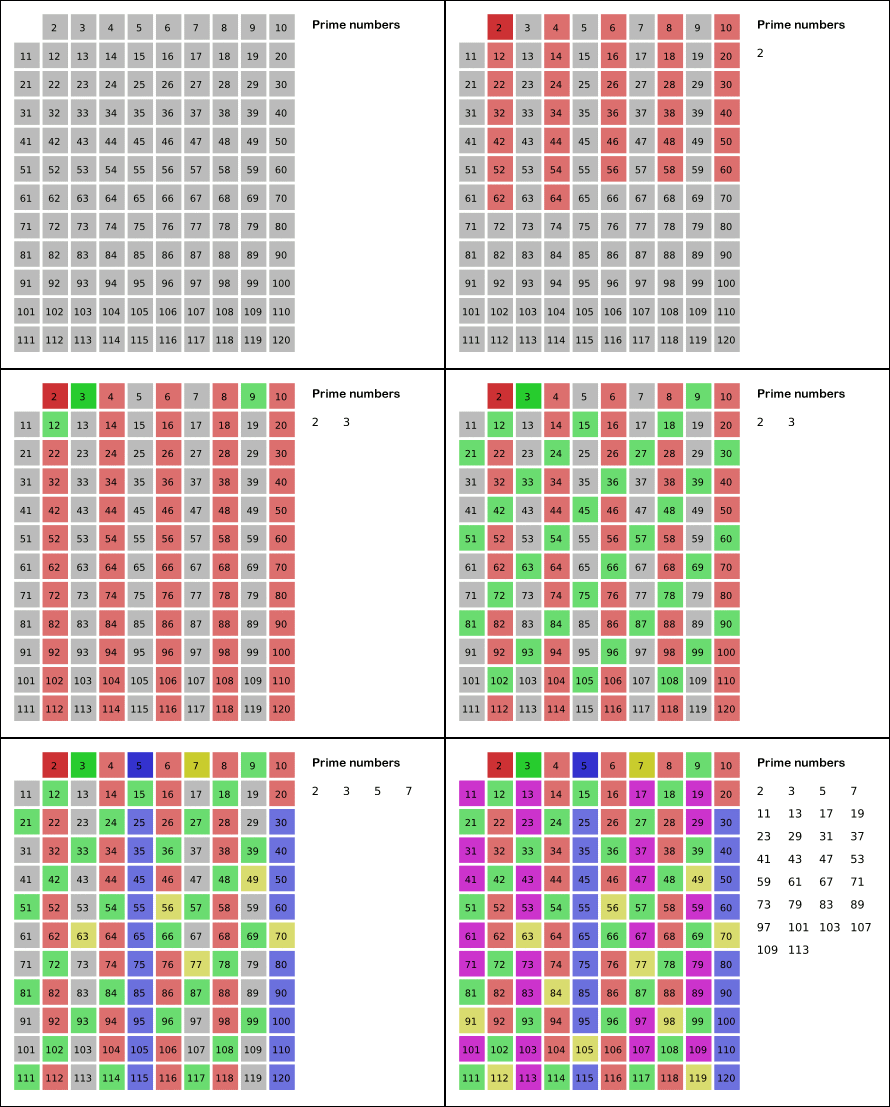
이번에는 소수를 구하는 또다른 방법을 구현해 보겠습니다.

소수는 예전에 구한 방법 이외에도, '에라토스테네스의 체'라는 방법을 이용해서 구할 수도 있습니다.


그림출처: http://en.wikipedia.org/wiki/Sieve_of_Eratosthenes

이 알고리즘을 설명하자면,
  1. 2에서부터 n까지의 수를 체에 넣고,
  2. 체에서 가장 작은 값을 소수로 체크하고, 그 수의 배수들을 모두 제외시킵니다.
  3. 위 2번 과정을 반복합니다.

여러가지 방법을 사용할 수 있겠지만, 딕셔너리를 이용해서 구현하면 다음과 같습니다.

# -*- coding: utf-8 -*-
import sys

if __name__=="__main__":
    print( sys.version )
    N = int( input("input a number : ") )
    #init
    sieve = {}
    for i in range(2, N+1):
        sieve[i] = 0
       
    # Sieve of Eratosthenes
    for i in range(2, N+1):
        if sieve[i]==0:
            n=2
            while i*n <= N:
                sieve[i*n]=1
                n+=1

    #print results
    for i in range(2, N+1):
        if sieve[i]==0:
            print( i, end="," )
    print()       
    input("press any key")

100을 넣고 실행해 보면 결과는 다음과 같습니다.

3.0 (r30:67507, Dec  3 2008, 20:14:27) [MSC v.1500 32 bit (Intel)]
input a number : 100
2,3,5,7,11,13,17,19,23,29,31,37,41,43,47,53,59,61,67,71,73,79,83,89,97,
press any key


AND

며칠 전 주네님으로부터, QT4.5가 LGPL로 릴리즈 예정이라는 소식을 들었습니다.

Qt adds LGPL license option
http://www.linuxdevices.com/news/NS4480114925.html

이제 이렇게 되면,
mobile에서도 QT를 올리고, pyQT로 쉽게 개발할 수 있는 환경을 만들수 있겠네요.

pyGTK로 mobile에서 노는 것과 차이는 별로 없을까요?
제대로 써보질 않아서 차이점을 아직 전혀 모르는 상태네요.
이에 대해서는 아래 글을 참고해 보면 될 듯 합니다.

Qt vs gtk - http://kldp.org/node/48496

여건만 된다면... 시간을 최대한 내서,
빨리 환경을 구축해서 놀아보고 싶은 생각이 간절합니다~


cf.
아래는 대충 찾아본 QT 관련 자료들 링크입니다.

  1. [QT/Embedded] Qt, Qt/Embedded, Qpe, Qtopia, OPIE 에 대한 개요
  2. QT - 저의 QT Embedded 개발환경
  3. Tutorial: Creating GUI Applications in Python with QT

AND

피보나치 수열은 위키피디아에 보면 다음과 같이 정의되어 있습니다.

피보나치 수가 처음 언급된 문헌은 기원전 5세기 인도의 수학자 핑갈라가 쓴 책이다. 한편 유럽에서 피보나치 수를 처음 연구한 것은 레오나르도 피보나치로 토끼 수의 증가에 대해서 이야기하면서 이 수에 대해 언급했다. n 번째 달의 토끼 수는

    * 첫 달에는 새로 태어난 토끼 한 쌍만이 존재한다.
    * 두 달 이상이 된 토끼는 번식 가능하다.
    * 번식 가능한 토끼 한 쌍은 매달 새끼 한 쌍을 낳는다.
    * 토끼는 절대 죽지 않는다.

이때 n번째 달에 a 쌍의 토끼가 있었고, 다음 n+1 번째 달에는 새로 태어난 토끼를 포함해 b 쌍이 있었다고 하자. 그러면 그다음 n+2 번째 달에는 a+b 쌍의 토끼가 있다.

그럼 이 수열을 파이썬에서 구현하면 어떻게 될까요?
다음과 같이 재귀함수를 이용해서 구현할 수 있습니다.

>>> def Fibonacci(n):
    if n<2: return n
    else: return Fibonacci(n-1)+Fibonacci(n-2)


또한 아래와 같이 generator를 이용할 수도 있습니다.
        
>>> def Fibonacci():
    a,b=1,1
    while 1:
        yield a
        a,b=b,a+b

결과출력.       
>>> for i,ret in enumerate(Fibonacci()):
    if i<20: print(i,ret)
    else: break
          
0 1
1 1
2 2
3 3
4 5
5 8
6 13
7 21
8 34
9 55
10 89
11 144
12 233
13 377
14 610
15 987
16 1597
17 2584
18 4181
19 6765
AND